


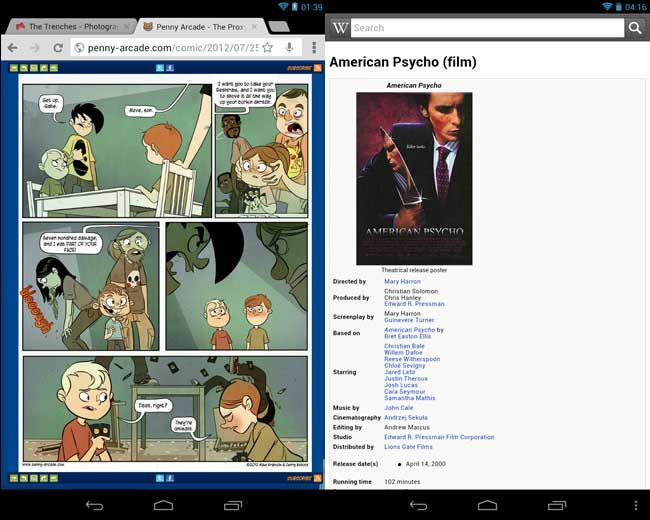
Left: Browsing is fast and works well, but the lack of Flash plug-in is disappointing. Right: It’s obvious that tablets are stuck between worlds as far as formatting goes.
Experience
The Nexus 7, like Amazon’s Kindle Fire, is a media consumption device. That you can be productive on it is incidental, rather than the intent. As such, when you start the device and hook your Google account up to it (which can be automatically populated when you order it from the Play Store, a cute touch), you’re immediately greeted by the Play content widget which grants you easy access to the media already included. (Like Transformers: Dark of the Moon. Yuck.) We’ll go over that slightly in a little bit, but I quickly tossed that widget out in favor of my own solutions, like Spotify for music and Kindle for reading, and since it’s stock Android, you’re not stuck with anything on there you don’t want.
I don’t really need to go over Android 4.1 improvements, but I’ll hit on them briefly.
- Jelly Bean is sliiiiiick. This is the first true effort by Google to make their OS move like butter (through the appropriately named Project Butter) and you don’t experience the chugginess inherent to every other Android device. Just like Ice Cream Sandwich (Android 4.0), you do get some cool tutorial slides when using it for the first time.
- Google Now is supposed to be your new personal assistant, but this is the worst device to introduce it on. Google Now features a bunch of traveler-friendly cards that learn where your home and work are and inform you about travel times when you’re to’ing and fro’ing. It has little widget cards to remind you about flights and weather and so forth. It’s basically a pro-active search tool on Google’s behalf, letting you know about pertinent stuff before you search for it. It’s a great idea, but being stuck on a wi-fi only device ameliorates its usefulness.
- Switching from Portrait to Landscape sends the system buttons to the bottom of the screen, rather than keeping them along the side. This is awesome.
- They got rid of all the blue Tron-like highlights from the system menus, muting them with white instead. This is lame.
The problem with this tablet, or any tablet, or any Android tablet for that matter, is that there are plenty of opportunities to see where tablets aren’t welcome, yet. There are a growing number of tablet-ready apps in the Play Store (which are not obviously labeled, by the way), but there are plenty, like the Facebook app, or many web sites in their raw browser format, that just don’t roll great on it at all. This device is stuck between the full desktop world and the full mobile world and the tablet gets the broken stuff in-between. Like maybe they don’t scale well, or they’re missing features altogether, it’s weird. It’s just the same as when you were using your iPod apps on your iPad when the latter came out, but unfortunately for Android users, Google has expressed apathy toward cultivating tablet-specific functionality in hopes that Android developers will just learn to scale their apps better. Hrm.
(ProTip: With a few tweaks in the settings, SwiftKey for Tablets works nearly perfect on here, I just wish the row where they display predictions were a bit bigger.)
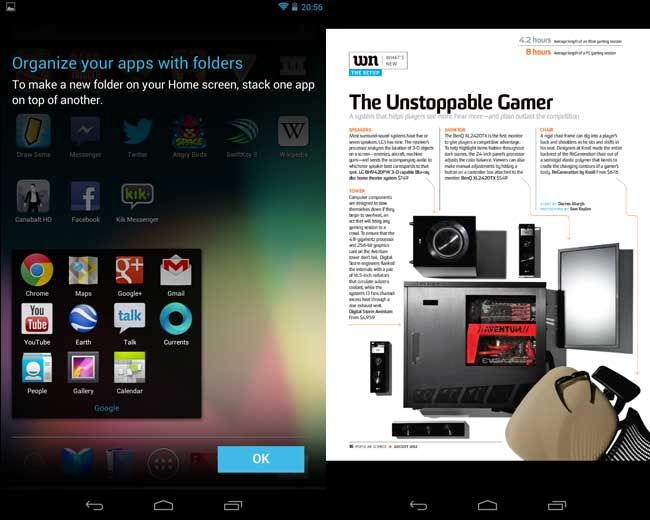
Left: Jelly Bean guides you along early on. Right: Magazines don’t quite work on a tablet this size.
Actually Using It For Media
Okay, so you bought a Nexus 7 to consume media, so how is consuming media on the Nexus 7? Pretty good. Renting movies from the Play Store is as super easy as you’d expect and by activating your Nexus 7, you automatically get a $25 credit toward the store, too. After using the Galaxy Tab 7 last year, I wasn’t sure how much I cared for using it as an e-reader, but I’m not docking for it. Magazines are a new format here and they give you a few to start. (Did you know that Esquire magazine is seriously 90% fragrance ads? I know!) I will tell you right now: this is not the device for magazines. No one actually made tablet-friendly versions of their mags, they merely took the original digital version and threw it in some PDF-ish format. On a screen this size, you will be constantly pinching and zooming in and out of the content to read it as it’s nearly micro-print in its native form. If this is the print mag industry’s solution to the digital question, then they deserve to die.
One area where the tablet turns up aces, that I honestly wasn’t expecting, was in gaming. Games that were crammed onto Android phones feel much more comfortable here. Grand Theft Auto III and Dead Trigger were playable on my Galaxy Nexus, but they feel really good on a 7″ tablet. Still other games like Triple Town were obviously ready to be on a device this large since the assets are already high-resolution. Then you get a whole new class of titles like Strikefleet Omega and Great Big War Game that were designed for the tablet and take advantage of it as well. (Look forward to some new Android gaming reviews soon!)
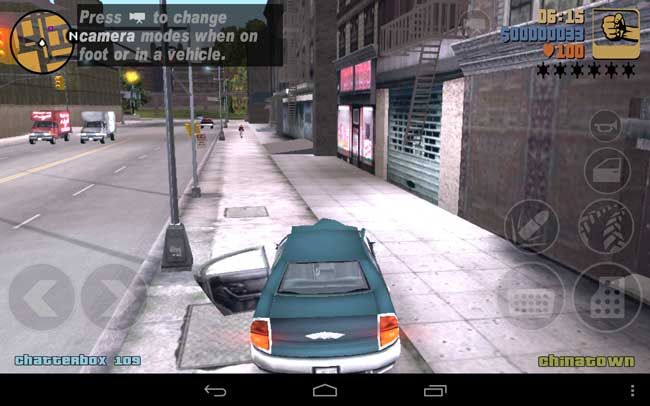
Grand Theft Auto III shines on the Nexus 7.
Conclusion
The struggle I’ve had with a tablet purchase is how and when I’ll use it when I already have devices with the same, or better, functionality. For your grandma, a tablet like this will replace their PC entirely and precludes their need for a smartphone. The Nexus 7 didn’t cannibalize much of my phone’s usage because its wi-fi-only status keeps it anchored in the house, but it is easier to tote around and use for gaming and media consumption than my laptop, which is what I’ll use when I need to be productive. If I were using my Nintendo DS at all, it’d be murdering that outright. The hardware is fantastic, Jelly Bean is an OS ready for tablets and even if the tablet-friendly content isn’t quite there, on its own merits, the Nexus 7 is a great device. Would I pick this over an iPad? Obviously, I did.
So do you really need a tablet? Again, it can be a hard case, but even if you don’t, at $199 for the 8GB model and $249.99 for the 16GB model, you’ll make a use case for the Nexus 7.






Don't Keep This a
Secret, Share It