


In The Beginning…
Steve Jobs’ tyrannical and ruthless execution as Apple’s CEO in the early 80s didn’t save him from being ousted, but it forced a ground-breaking and unified approach to the graphic user interface (y’know, using a mouse instead of having to type everything in, line by line). Microsoft would eventually grow far larger than Apple through the 90s and 00s, but Jobs always had an eye for aesthetics. Early on, Windows was not a pretty pony.
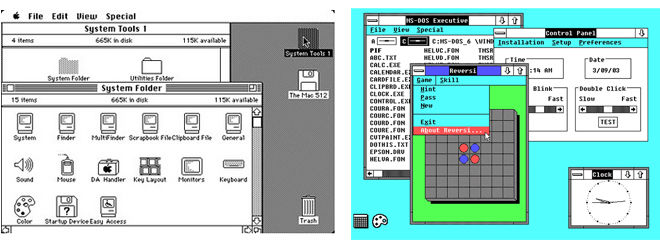 Apple System 6 vs. Microsoft Windows 2.0 (1987)
With the release of Windows 95, Microsoft decided that diverging from their PARC Labs/”Mac clone” roots would: A) call off Apple’s lawsuit in which they state Microsoft ripped their interface off and B) just be more functional altogether. The Director for User Interface on Windows 95 was a guy named Joe Belfiore, who we’ll get to know a little later. At a glance, it seems bizarre that we would ever fall in love with Windows 95 like we did, buying millions of copies.
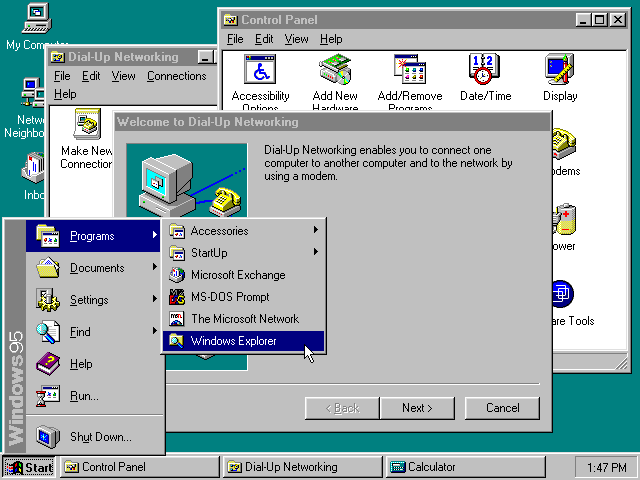 Windows 95: definitely looks better, but man, those Start Menu trees could scroll on forever…
Things started looking prettier for Microsoft by the early aughts, Microsoft going so far as to bring on Mac-exclusive artists to design the iconography for Windows XP. At the same time, the world was being won over Jobs’ reboot of Apple OS with their tenth release, X, featuring candy-like buttons and glassy icons (a look named “Aqua”) that the rest of the industry would mimic for years.
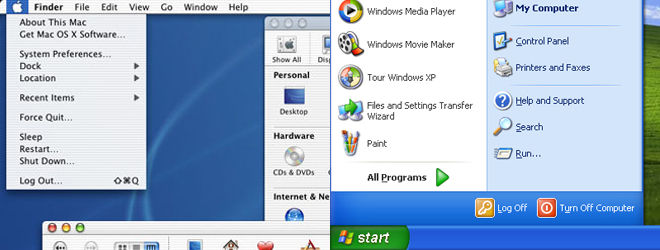 Apple’s OS X vs. Microsoft’s Windows XP (2001)
Metro Begins…
In late 1999 and 2000, a group of renegade Microsoft employees worked up a plan to compete against Sony’s PlayStation 2, the impending sequel to the most popular video game console on the market and one of the most important of all time. The company’s attempts to bring their business into the living room had failed up to that point, and their expensive acquisition of WebTV had been largely a waste. They provided a version of Windows for Sega’s Dreamcast, but hardly any developers used it. The renegades wanted to create a set-top box with a stripped down version of Windows, minus all of its identifying marks, and a simplified interface. Many of the old guard were hesitant on their support, including then-CEO Bill Gates. What did they mean ‘it wouldn’t run Windows’? They couldn’t surf the web? We couldn’t sell them copies of Office for it? The PC games we’re making aren’t going to be compatible with it? What is this?
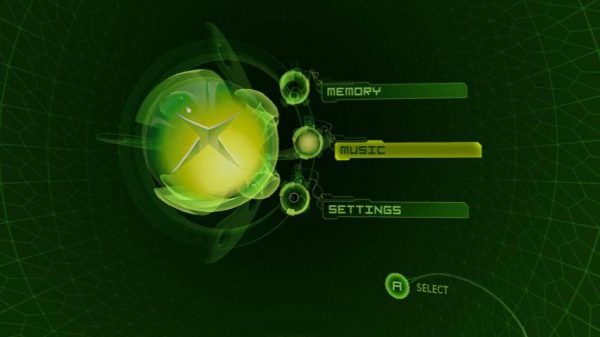
The renegades eventually won over and brought over one of the company’s first interfaces optimized for 16×9 TVs and simplified navigation, the console released in 2001, called the Xbox. The dark and moody green UI was designed externally by LA-based Rezn8, well known for Super Bowl and Big Three TV network design packages. While the Xbox boasted incredible power and functionality over the PlayStation 2 and Nintendo’s GameCube, like those consoles, the flashy menus weren’t very efficient and the team was still a long ways from the Metro dream.
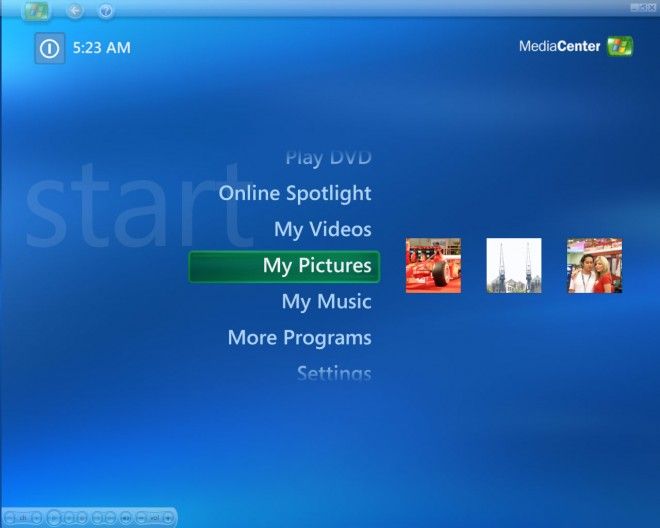 The first version of Windows Media Center, notice the Trebuchet typeface, common to Windows XP
As part of a multi-prong attack, Microsoft developed Windows Media Center. The idea was simple enough: take a fully-loaded PC, install this special version of Windows on it, add a tuner card, and there’d be no need for a separate cable box or DVR. With Media Center acting as a giant program, you had the added bonus of running a full version of Windows underneath, so you could surf the web, send and receive e-mails, view photos and play music you already had… it was designed to be a dream machine. A new, clean interface (featuring twist!) was designed for easy navigation with standard TV remotes, rather than mice and keyboards, which don’t work terribly well in a TV/couch situation (known as the “10 foot experience”). It’s in Media Center that we see the first inklings of Metro against Windows XP’s blue and green theme, with typography serving as buttons, simple, small graphics, and a conservative use of real estate. Released in 2004, it wasn’t available at retail, but rather on pre-built systems or as an OEM install disc if you were building your own machine. Eventually included in almost every version of Windows Vista and Windows 7, Media Center has always remained an enthusiast product because of the complex setup required (not to mention, the other PC you need to put it on). Media Center was a development of the “eHome” division at Microsoft, run by, DUN DUN DUN…
 …JOE BELFIORE!!!!!!! (circa years ago)
Early Xbox 360 and Zune
While the Xbox trucked on to (barely) beat the GameCube as far as hardware units sold went, it had built a lot of mindshare amongst the hardcore gamers that felt Nintendo was abandoning them. To try and best the PlayStation 3, Microsoft opted to release their next console, the Xbox 360, ahead of the standard five-year console cycle. Integrating a ton of vibrant colors and some tricks from Media Center, the console’s “blade” interface was the most elegant and powerful of any console ever released, although not quite Metro-grade yet.
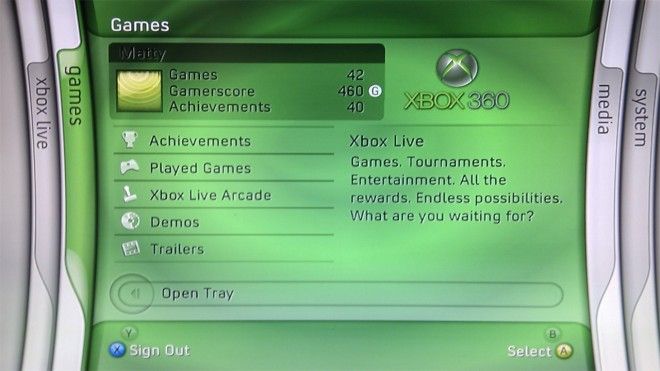 The original Xbox 360 “Blades” Interface (2005) Notice the Convection typeface, developed by Ascender for the console, would end up in Zune as well.
Good ol’ Joe would eventually go on to head up J Allard’s Zune division, quickly making an impression. While launching five years after the iPod had already begun its reign of terror on the portable music industry, the Zune a lot of cool features, such as the subscription-based Pass, a large screen for video, the ability to send samples of music over Wi-fi and the same twist interface from Media Center. The 1.0 home software was a re-skinned version of Windows Media Player that was… not good.
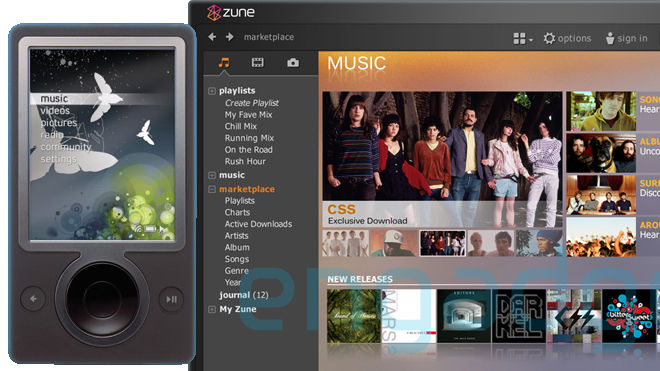 Zune 30 with Zune 1.0 software (2006). See, there’s Convection again.
It would be 2007 that Metro would begin to really come together under the Home & Entertainment Division…





Don't Keep This a
Secret, Share It